
Network vs Server vs Application
Introduction
The game of ping pong is something I enjoyed in my youth, like many of us. Working in the IT industry, I didn’t expect to be troubleshooting network issues playing ping pong with various operational teams and support groups. But here we are, the bottom of 2021, and exonerating the network infrastructure can still be very frustrating!
Network metrics data and system telemetry is increasingly providing evermore valuable insights into network flow behaviour and anomalies. The deluge of data can be overwhelming, including noncritical events, logs, metrics, and alerts.
The shared responsibilities in the cloud and layered network ownership creates increasingly challenging incident ownership, troubleshooting, and dealing with the SLA process for today’s hybrid operational teams. Incident Response optimization and reducing MTTR become the focus when dealing with multiple support teams and organizations and quickly getting to the data! Not only do we deal with the operational ping pong with our server, platform, or DevOps teams, now we have to factor in Cloud Service Provider support teams like AWS and Azure. Send us your PCAP!
Before dropping into a use case for cloud operations, let’s first review a few definitions. Figure 1 below shows a typical client-server TCP connection flow. Having an agentless monitor (cVu-V) in the conversation path, we can report on many Key Performance Indicators (KPIs) to help understand the health of the connection flow and specific latency.

KPI Definitions:
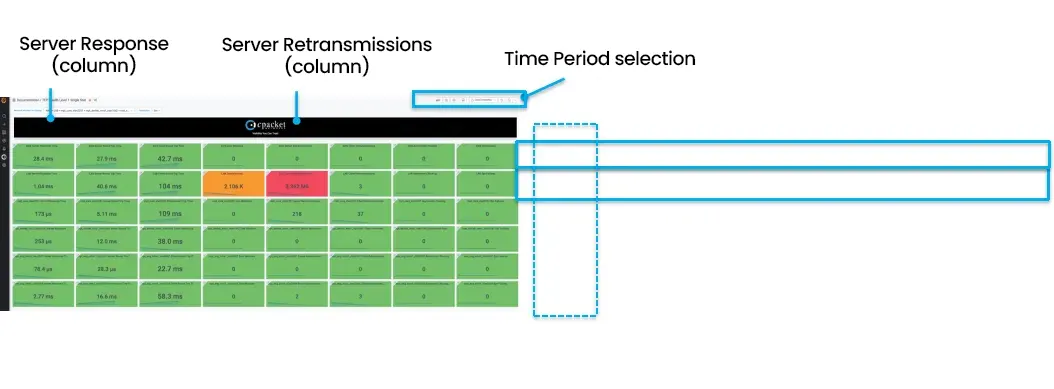
Server Response Time – Network Latency (DIFF between packet SYN and SYN-ACK)
Server RTT – The average round trip time from the server (Network Latency + Server Processing)
Client RTT – The average round trip time from the client (Network Latency + Client Processing)
zWins –The number of zwins from the server across all active sessions
Connection Error – Initial connection SYN packet not acknowledged (no SYN-ACK)
Retransmissions – The number of retransmissions from the server
Active sessions – The number of TCP sessions that sent packets during the measurement time slice
Network Monitor – VLAN segment, port groups, CDIR block, or network vantage point etc
At cPacket we like to talk about the 4Ws of pinpointing the root cause of complex problems, the What, Where, When, and Why? cPacket adds virtual packet broker appliances (Network Packet Broker cVu®-V) into the infrastructure to provide lossless network monitors (aka vantage points) to collect, replicate, filter, and forward packets. Network monitors strategically located in the network infrastructure forward traffic to security, forensics, NDR, performance, and packet capture tools. cPacket cStor® Packet Capture appliance provides network packet storage and archiving for forensic investigation, and the cClear® Analytics Engine appliance provides the KPIs visualizations through a single pane of glass.
Upon receiving a call from a Help Desk or a disgruntled customer, the priority is to identify the root cause of the problem and separate the client/server, application, or a pure network infrastructure problem as quickly as possible. Is it the VM instance, application, or network?


It really is that easy and quick to pull back the PCAP files whenever the incident was reported and work on the forensic details.
TCP Health dashboard (if you do not have specific client/server details)
From the Dashboard options, Figure 2 shows the TCP Health displayed via the network segments horizontally (i.e., DMZ, AWS, LAB) and the KPIs listed in columns. This tells you which part of the network is displaying problematic issues and which are operating normally. This gives the operator a high-level view of the network segments and a general indication of health. This is an excellent high-level starting point. The TCP Health visualization below very quickly shows the incident isolated in the LAB segment, impacting Server Retransmissions and Zero Window KPIs and network services healthy for the last 5 minutes. The What, Where, and high-level When.
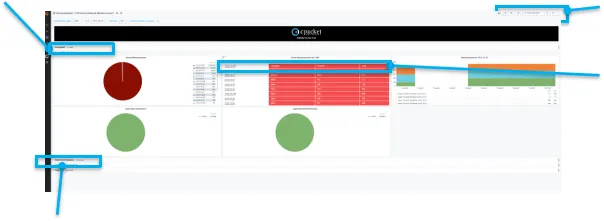
Now we have the IP addresses we are interested in, selecting the download is very simple, as shown in figure 4. There are options for filtering, including Berkley Packet Filtering (BPF) to narrow and home in on the data of interest.

Summary
At cPacket Networks, we understand network visibility and the operational complexity of today’s modern networks. The power of cCloud® Visibility Suite for troubleshooting consists of agentless appliances for broking, capturing, and analyzing network traffic essential for identifying if an issue is Network, Server, or Application centric. This gives much greater confidence when working on a P1 incident during an enormously stressful time. Be the hero rather than playing ping pong. Good Hunting!
Author
Nadeem Zahid
Chief Marketing – Mach 01