
What Is Email Marketing?
Introduction
Email marketing is one of the most direct ways for businesses to communicate with prospects, customers, and subscribers. When planned correctly, email can do more than promote a product or service—it can bring qualified visitors back to your website, nurture leads, distribute content, and support conversions. But successful email marketing requires more than writing an email and pressing Send. A strong email program depends on several connected elements: audience targeting, valuable content, email infrastructure, DNS configuration, SPF, DKIM, DMARC, sender reputation, list quality, deliverability, and consistent sending practices.
This guide explains what email marketing is, how it can contribute to website traffic and lead generation, how to set up a sending domain, and how to build a healthy sender reputation through responsible email warm-up.
What Is Email Marketing?
Email marketing is the use of email to communicate with an audience for purposes such as education, lead nurturing, content distribution, product promotion, customer communication, and relationship building.
Businesses can use email marketing to:
- Drive traffic to website content
- Promote products and services
- Nurture prospects
- Generate leads
- Distribute educational content
- Re-engage subscribers
- Support customer retention
- Promote webinars and events
- Share company updates
- Move prospects through the buyer’s journey
Unlike relying entirely on search engines or social media algorithms, email gives businesses a direct communication channel with people who have provided an email address and, depending on the campaign and applicable rules, agreed or otherwise are permitted to receive commercial communications.
For a B2B company, an email campaign might introduce a new service, distribute a research report, invite prospects to a webinar, or direct readers to a detailed learning resource.
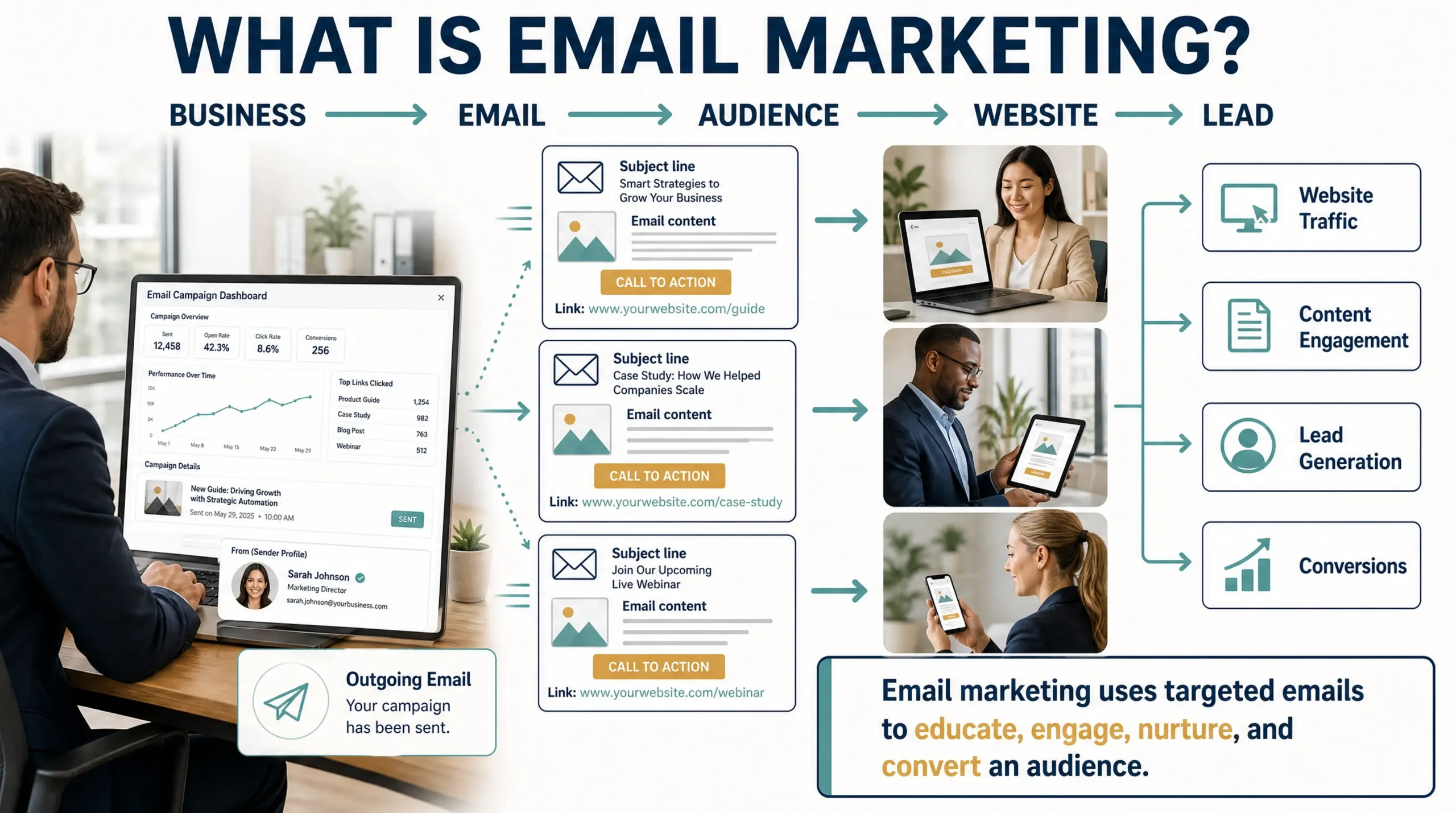
Diagram 01: Email Marketing
How Does Email Marketing Drive Website Traffic?
Email can become an important traffic source when campaigns provide a clear reason for recipients to visit a website.
For example, a company publishes a new guide about digital marketing strategy. Instead of waiting for organic search traffic to build, the company can distribute the guide to an appropriate email audience.
The journey can look like this:
Email → Click → Website → Content → Engagement → Lead → Sales Conversation
Email traffic can support several types of website activity:
Content Traffic
Businesses can use email newsletters to promote:
- Blog posts
- Learning pages
- Research reports
- Case studies
- Industry guides
- Whitepapers
- Webinars
Product and Service Traffic
Email can also send qualified visitors to:
- Product pages
- Service pages
- Pricing pages
- Demo pages
- Consultation pages
- Contact forms.
Lead Generation Traffic
A campaign can direct recipients to a landing page where they can register for an asset, webinar, consultation, or other relevant offer.
The important point is that email should not be viewed simply as a traffic-generation channel. The quality and relevance of the traffic matter more than the number of clicks.
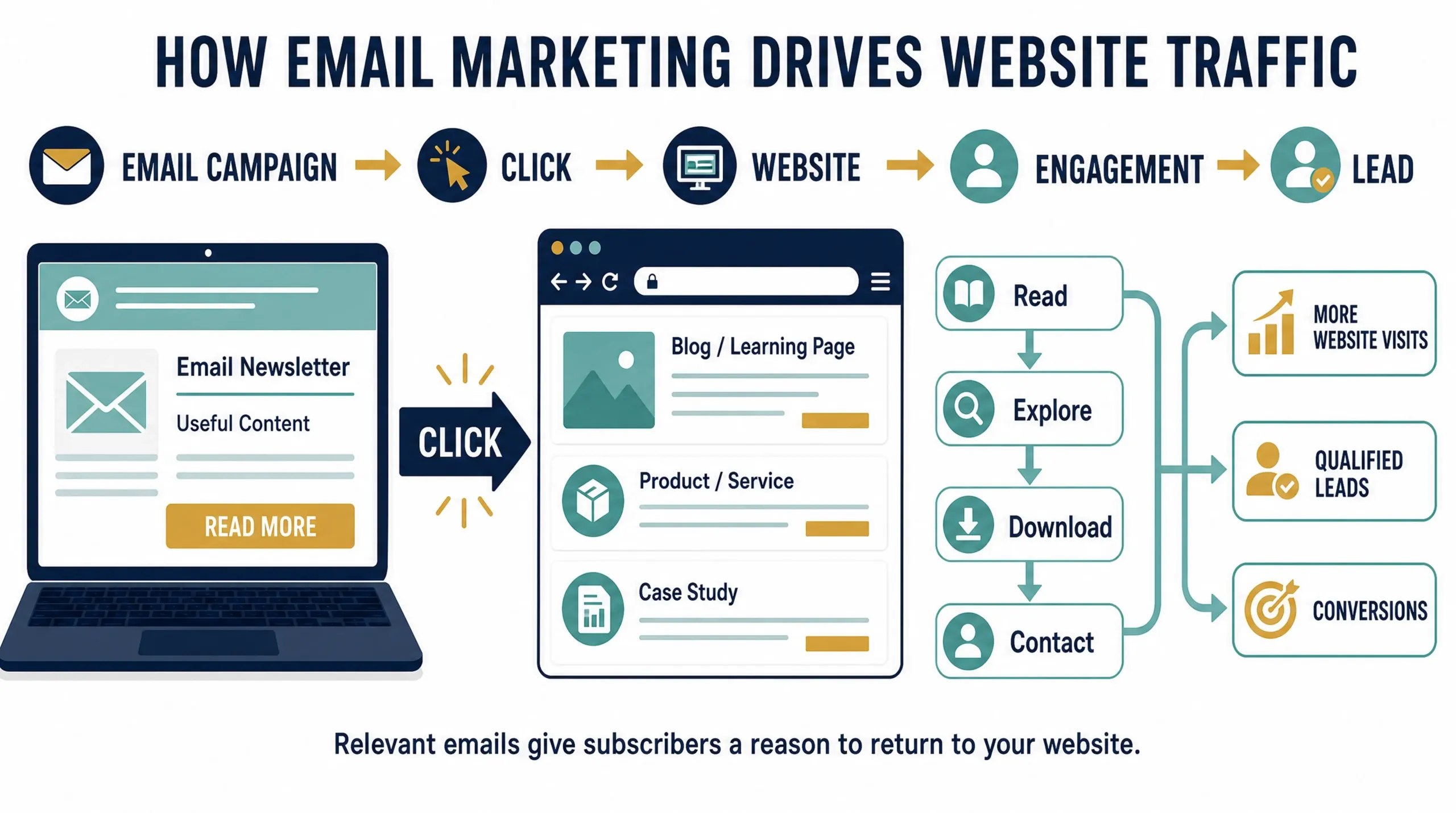
Diagram 02: Email Marketing Flow
Email Marketing and the Buyer’s Journey
Email can support prospects at different stages of the buyer’s journey.
Awareness
At the awareness stage, prospects are learning about a problem or opportunity.
Useful email content can include:
- Educational articles
- Industry insights
- Research
- Guides
- Newsletters
- Trend reports
Consideration
At the consideration stage, prospects are comparing approaches and potential solutions.
Useful content includes:
- Case studies
- Comparison guides
- Webinars
- Product information
- Expert guides
- Solution-focused content
Decision
At the decision stage, prospects may be evaluating specific providers.
Useful content includes:
- Demonstrations
- Customer success stories
- Service information
- Pricing information
- Consultation offers
- Product comparisons
This makes email particularly valuable when it is integrated with the broader digital marketing strategy rather than treated as a separate channel.
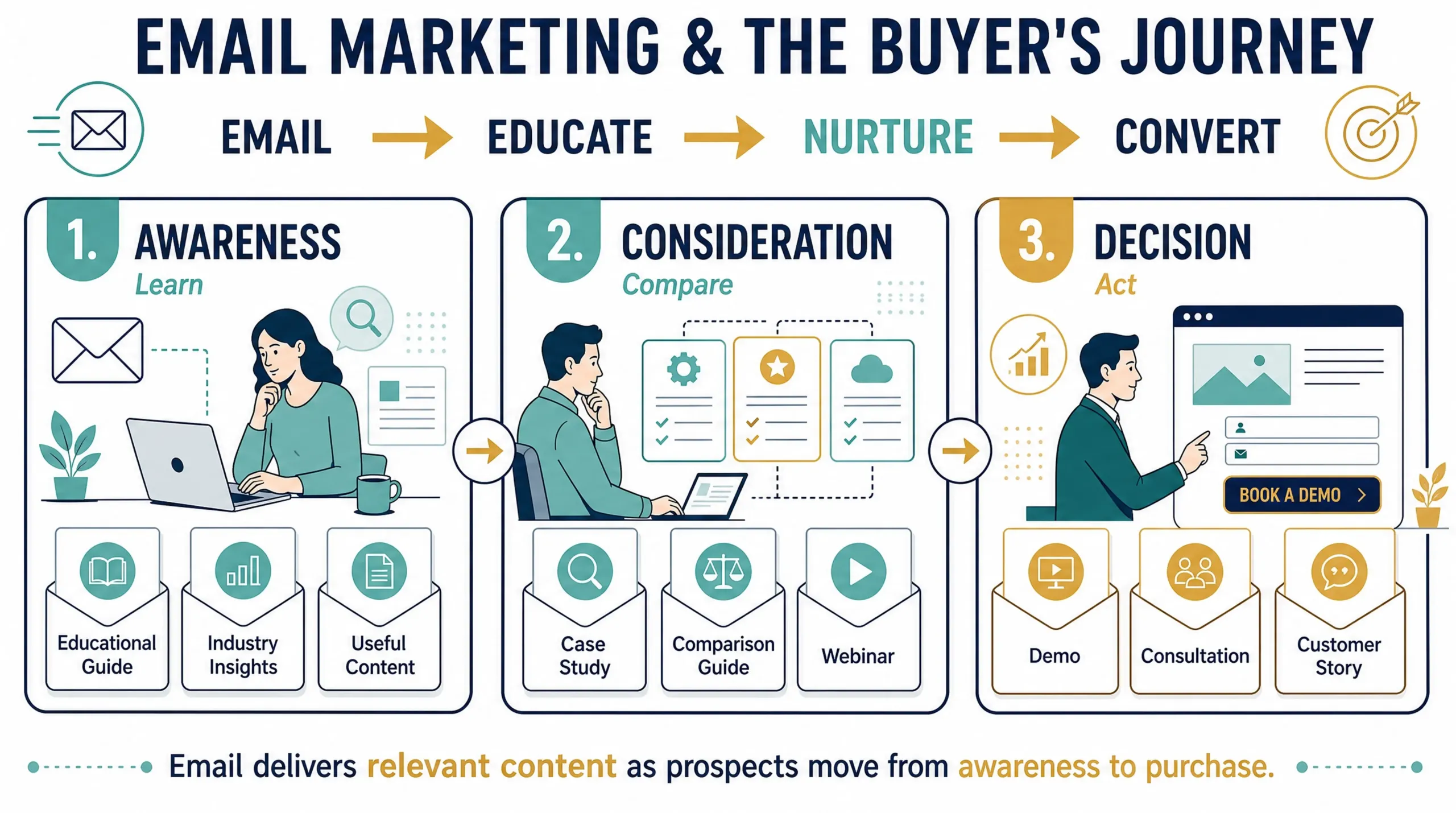
Diagram 03: Buyer’s Journey
What Are the Benefits of Email Marketing?
A well-managed email marketing program can provide several benefits.
1. Direct Audience Communication
Email provides a direct communication channel with subscribers and customers.
2. Website Traffic
Relevant campaigns can consistently send visitors to valuable website content and commercial pages.
3. Lead Nurturing
Not every prospect is ready to buy immediately. Email allows businesses to continue providing useful information until a prospect is ready to take the next step.
4. Content Distribution
Email can help newly published content reach an existing audience rather than depending entirely on organic search or social media.
5. Customer Engagement
Regular, relevant communication can keep a business visible to its audience.
6. Measurable Performance
Email platforms can provide campaign-level metrics such as clicks, bounces, unsubscribes, and other delivery and engagement measurements.
7. Marketing Automation
Email campaigns can be triggered by actions such as:
- Form submissions
- Content downloads
- Event registrations
- Purchases
- Previous engagement
- Changes in customer status
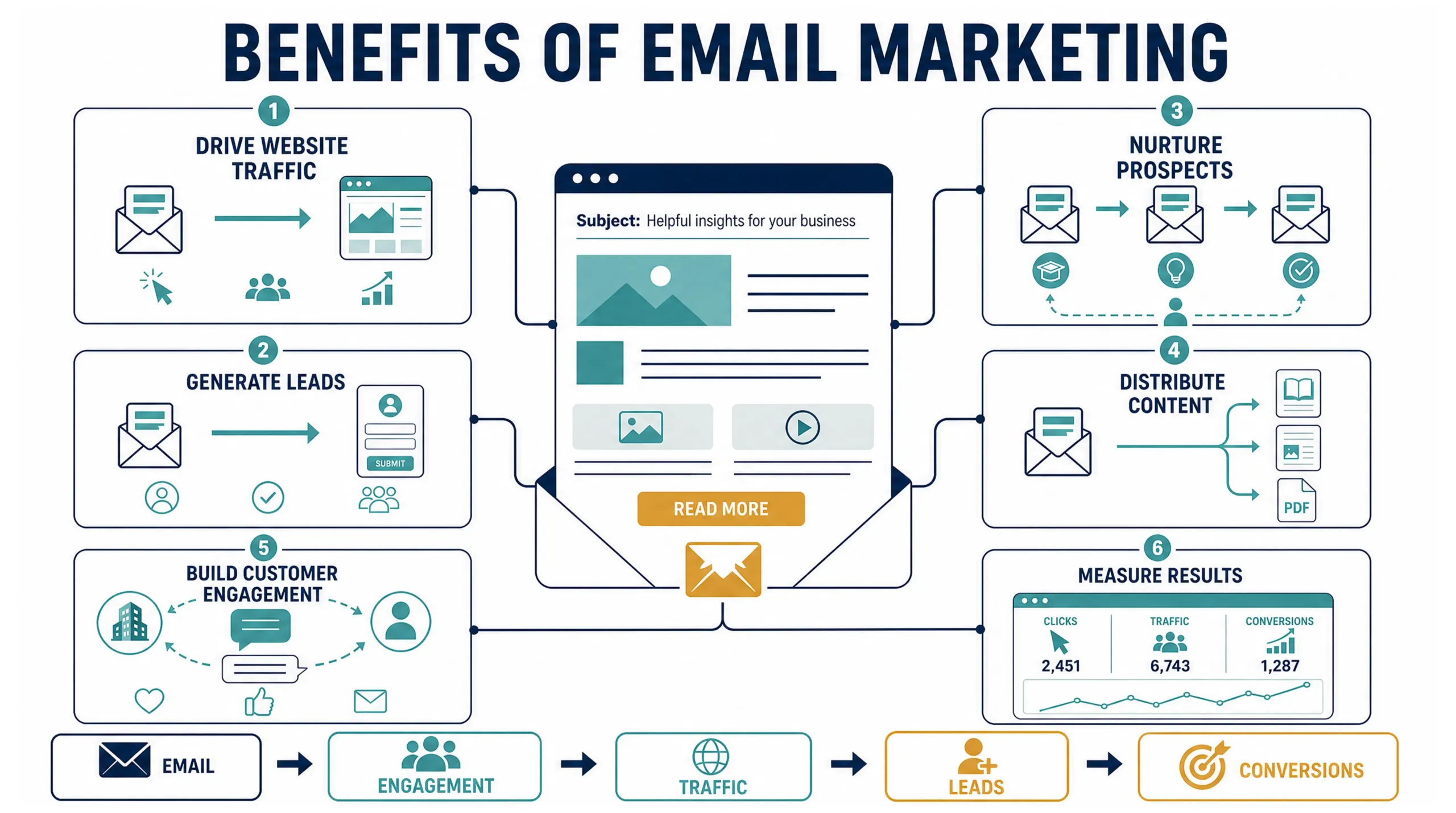
Diagram 04: Benefits of Email Marketing
Email Marketing Best Practices
Successful email marketing starts with the quality of the audience and the relevance of the message.
Build a Quality Email List
Do not treat the size of an email database as the primary measure of success. A smaller, engaged audience can be more valuable than a large database containing inactive, invalid, or uninterested addresses. Avoid purchasing email lists. Google specifically recommends sending to people who want to receive messages.
Segment Your Audience
Different prospects have different interests and levels of buying intent.
Segments can be based on:
- Industry
- Job role
- Previous interactions
- Content interests
- Customer status
- Lead stage
- Geographic market
- Previous purchases
Segmentation allows businesses to make campaigns more relevant instead of sending identical messages to everyone.
Write Clear Subject Lines
Your subject line should accurately represent the email. Avoid misleading or deceptive subject lines. The FTC’s CAN-SPAM guidance specifically requires commercial email subject lines to accurately reflect the content of the message.
Provide Useful Content
Every email should give the recipient a reason to read or click.
Examples include:
- A useful article
- An original insight
- A research report
- A practical guide
- A relevant offer
- An event invitation
- A product update
Use One Clear Primary Call to Action
A campaign can contain multiple links, but the primary action should be obvious.
Examples:
Read the Guide
Book a Consultation
Register for the Webinar
View the Case Study
Optimize Emails for Mobile Devices
Many recipients read email on mobile devices. Emails should therefore use:
- Responsive layouts
- Readable typography
- Clear buttons
- Short paragraphs
- Concise subject lines
- Lightweight images
Make Unsubscribing Easy
An easy unsubscribe process protects both the recipient experience and sender reputation.For bulk marketing to Gmail accounts, Google requires one-click unsubscribe for marketing and subscribed messages, along with a visible unsubscribe option in the message body. Yahoo has similar requirements for bulk senders.
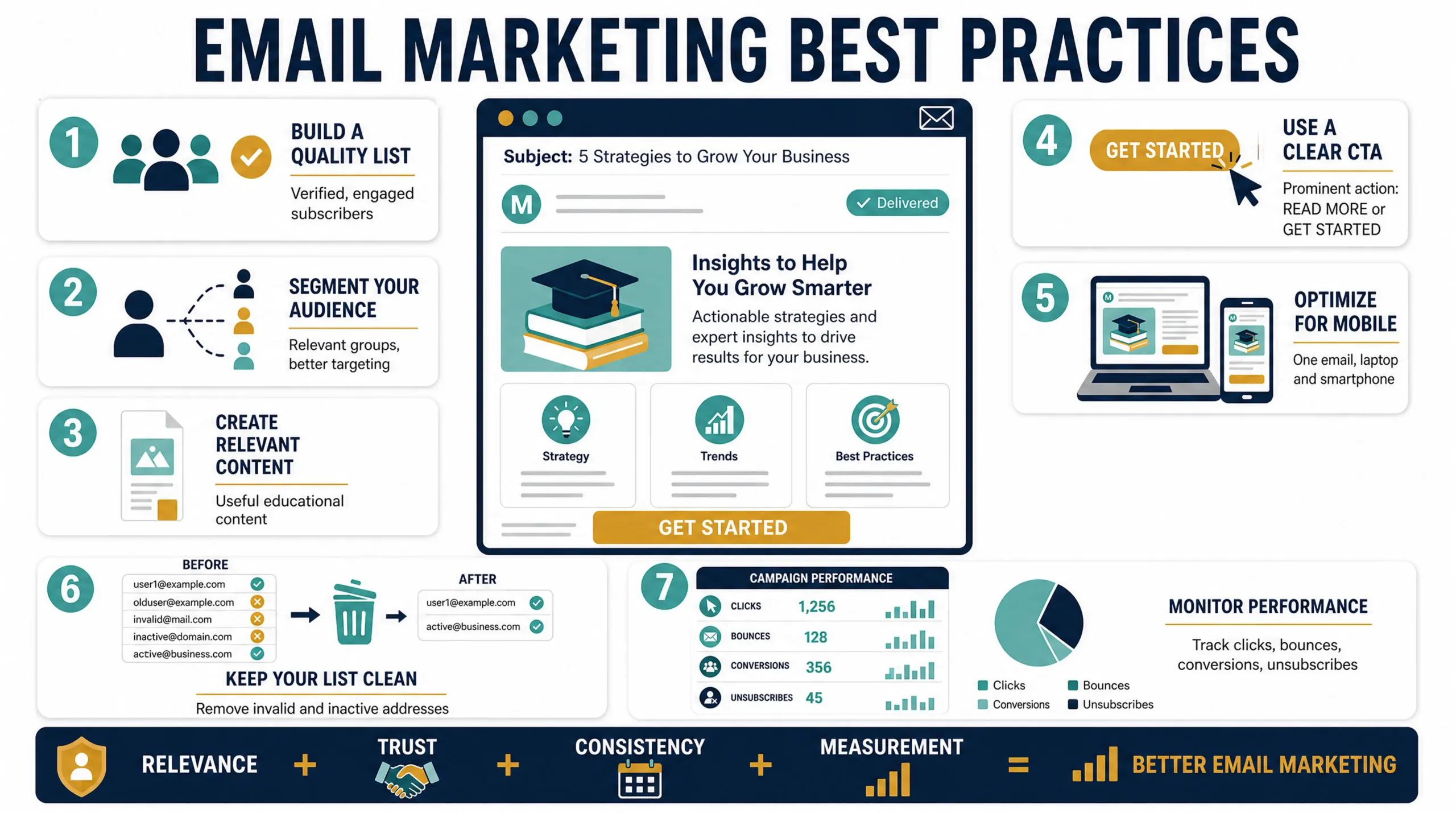
Diagram 05: Best Practices
Email Deliverability: Why Your Email May Not Reach the Inbox
Email marketing only works when messages reach the intended recipients.
Deliverability refers to the ability of email messages to successfully reach recipients’ mailboxes rather than being rejected or filtered into spam.
Deliverability can be affected by:
- Sender reputation
- Domain reputation
- IP reputation
- SPF authentication
- DKIM authentication
- DMARC
- DNS configuration
- Spam complaints
- Bounce rates
- Recipient engagement
- Sending volume
- List quality
- Email content
Domain Reputation vs Domain Rating
These terms should not be confused.
Domain Rating (DR) is primarily an SEO metric associated with the strength of a website’s backlink profile. Email systems instead evaluate signals associated with sender and domain reputation to determine whether messages should be delivered, filtered, or rejected. Therefore, setting up DKIM or warming an email domain does not directly increase your SEO Domain Rating.
Instead, proper email authentication and responsible sending practices help establish a trustworthy email-sending identity and support better deliverability.
Email Domain Setup: What DNS Records Do You Need?
Before launching an email marketing campaign, configure the technical infrastructure of the sending domain.
The exact DNS records depend on your email service provider, but a typical setup involves:
- SPF
- DKIM
- DMARC
- Tracking or custom sending-domain records
- Other provider-specific DNS records where required
Google recommends SPF, DKIM, and DMARC for improving email authentication, with SPF or DKIM required for all senders and all three required for bulk senders to Gmail personal accounts.
What Is SPF?
SPF, or Sender Policy Framework, is a DNS-based email authentication mechanism that identifies which servers or services are authorized to send email on behalf of a domain.
For example, if a company uses an email marketing platform, the provider may give the company an SPF value that needs to be incorporated into the domain’s SPF configuration.
The purpose is to help receiving systems verify whether a sending source is authorized. An important implementation point is to maintain a single valid SPF record for a domain and include all legitimate sending services within the appropriate SPF configuration.
What Is DKIM?
DKIM, or DomainKeys Identified Mail, allows an email-sending system to attach a cryptographic signature to outgoing messages. The receiving mail server can use the public key published in DNS to verify the signature. This helps establish that the message was authorized by the domain associated with the DKIM signature and that the signed content has not been improperly altered.
Google recommends using a DKIM key of at least 1,024 bits for sending to personal Gmail accounts and recommends 2,048-bit keys where supported.
What Is DMARC?
DMARC, or Domain-based Message Authentication, Reporting and Conformance, builds on SPF and DKIM. It allows a domain owner to publish a policy telling receiving systems how to handle messages that fail authentication and can provide reporting about authentication activity. Google recommends DMARC for sending domains and requires it for senders exceeding its bulk-sender threshold to personal Gmail accounts.
A common approach is to begin monitoring with a less aggressive DMARC policy, analyze legitimate sending sources, and then strengthen enforcement as the configuration becomes reliable.
Why DNS Configuration Matters for Email Marketing
DNS is part of the foundation of email deliverability.
Incorrect DNS configuration can lead to authentication failures and delivery problems.
Before launching campaigns, verify:
- SPF is correctly configured
- DKIM is passing
- DMARC is published
- Sending-domain alignment is correct
- Tracking domains are configured where required
- Sending infrastructure meets your provider’s requirements
- DNS records have propagated successfully
For high-volume sending infrastructure, Google also discusses forward and reverse DNS requirements for sending IP addresses.
What Is Email Domain Warm-Up?
Email domain warm-up is the process of gradually increasing email sending volume so that inbox providers can observe a consistent sending pattern and recipient engagement.
A new sending domain or infrastructure should not suddenly move from little or no activity to a large campaign volume.
Inbox providers evaluate factors such as:
- Sending volume
- Sending frequency
- Recipient engagement
- Spam complaints
- Bounces
- Authentication
- Historical sending behavior
Google recommends increasing sending volume gradually, sending consistently, avoiding sudden spikes, and monitoring delivery and reputation signals as volume increases.
Email Warm-Up Best Practices
A strong warm-up should focus on quality before volume.
- Start with engaged recipients.
- Increase volume gradually.
- Maintain consistent sending patterns.
- Avoid sudden volume spikes.
- Keep bounce rates low.
- Monitor spam complaints.
- Remove invalid addresses.
- Suppress recipients who repeatedly show no engagement.
- Keep SPF, DKIM, and DMARC correctly configured.
- Monitor authentication and delivery signals.
- Do not purchase email lists.
How to Maintain a Healthy Sender Reputation
Warm-up is only the beginning. Sender reputation needs to be maintained through every campaign.
Keep Your Email List Clean
Remove invalid addresses and manage inactive recipients appropriately.
Monitor Spam Complaints
A high spam complaint rate is a strong warning signal.Google recommends keeping spam rates below 0.10% where possible and avoiding 0.30% or higher.
Keep Sending Consistent
Avoid moving suddenly from a small campaign to a very large campaign.
Segment Your Audience
Relevance improves the likelihood that recipients will engage rather than ignore or report your messages.
Monitor Authentication
Regularly verify that SPF and DKIM are passing and that DMARC is functioning as expected.
Use Postmaster Tools
Google Postmaster Tools provides information about authentication, delivery errors, spam reports, and other signals related to mail sent to Gmail users
Email Marketing Metrics to Track
Do not evaluate an email campaign using only one metric.
Important metrics include:
Delivery Rate
Measures how many messages were successfully delivered.
Bounce Rate
Shows the percentage of messages that could not be delivered.
Click-Through Rate
Measures how frequently recipients click links in an email.
Conversion Rate
Measures how many recipients complete the desired action after clicking.
Unsubscribe Rate
Shows how many recipients opt out after receiving a campaign.
Spam Complaint Rate
Measures how frequently recipients report messages as spam.
Website Traffic
Use analytics and campaign tracking to understand how much website activity is generated by email.
Email-Generated Leads
Track the number of qualified leads that originate from email campaigns.

Diagram 06: Email Marketing Metrics to Track
How to Build an Effective Email Marketing Strategy
An effective strategy can be built around seven stages:
1. Define the audience
Identify who should receive the message.
2. Define the objective
Decide whether the campaign is intended to generate traffic, leads, registrations, sales, engagement, or another outcome.
3. Create the content
Provide information or an offer that is relevant to the audience.
4. Build the campaign
Create the email, landing page, tracking links, and call to action.
5. Verify deliverability
Check authentication, DNS, links, unsubscribe functionality, and campaign configuration.
6. Send responsibly
Use appropriate segmentation and controlled sending volumes.
7. Measure and optimize
Review traffic, clicks, conversions, bounces, complaints, and other relevant metrics.
Final Thoughts
Email marketing is most effective when it is treated as part of a broader digital marketing strategy rather than simply as a tool for sending promotional messages.
The strongest email programs combine relevant content, audience segmentation, technical authentication, responsible sending practices, domain reputation management, and measurable conversion goals.
Before increasing email volume, businesses should establish a reliable technical foundation with DNS, SPF, DKIM, and DMARC. They should then build sending reputation gradually, maintain clean lists, monitor recipient feedback, and continually optimize campaigns.
When email marketing is connected to SEO, content marketing, lead generation, and the buyer’s journey, it can become a powerful system for bringing qualified visitors back to a website and moving prospects toward conversion.